Page 2 of 2
Re: Tips for improving game running speed
Posted: Wed Jan 12, 2022 1:00 pm
by rafaeltodero
I think this tip is very important. It would be really cool if she was in the game along with the other tips. Here in the Forum not everyone enters, and sometimes there are a lot of posts and that makes it "hidden".
Re: Tips for improving game running speed
Posted: Sun Jan 07, 2024 8:03 pm
by luckhomerun
I observed that the game currently utilizes only one core on the CPU. In contemporary times, CPU advancements focus on increasing the number of cores rather than elevating the speed of a particular core. I believe there is significant potential for enhanced late-game performance if you explore the possibility of implementing multi-threading. By structuring each opponent as a separate task, it could be feasible to distribute these tasks across different threads with relative ease. This approach has the potential to tap into the full power of modern multi-core processors, thereby optimizing overall game performance.
Re: Tips for improving game running speed
Posted: Wed Jan 10, 2024 4:17 am
by mohmaaytah
Using more than one core has been discussed before but due to the size of the dev team it would take a significant amount of time and effort which could otherwise be used to add to the core features of the game.
Re: Tips for improving game running speed
Posted: Thu Sep 19, 2024 8:19 pm
by maff
mohmaaytah wrote: Wed Jan 10, 2024 4:17 am
Using more than one core has been discussed before but due to the size of the dev team it would take a significant amount of time and effort which could otherwise be used to add to the core features of the game.
Based on this premise, the game will become increasingly slower, as new features will be released... using only one core.
I don't say in my case, 15 cities always maximum competitors, PC can handle it, however there are other people who play with more modest PCs
Re: Tips for improving game running speed
Posted: Fri Sep 20, 2024 1:24 pm
by David
Please read this article explaining why writing simulation code to utilize multi-core CPUs in Capitalism Lab is impractical:
viewtopic.php?t=9875
Re: Tips for improving game running speed
Posted: Thu Sep 26, 2024 12:24 pm
by anjali
never had performance issues with 8 core 2x8gb Sapphire R9 390x, 64gb ram + SSD and turbo disabled to keep the system cool, dont want to enable turbo as that gonna bump up the cpu temperature like hell and i dont need a massive heater in the house when air condition is running 24/7 to keep a 23 degrees in the house as we got 37degrees in the shades all year round. w/o air condition i would have 40+ degrees in the house wuth open windows.
a 3.5ghz core can handle the game with ease in my experience but thats old tech i seen mainly only around 2ghz or less on majority of new PCs can imagine that they get trouble. and not everyone wants to spend more then $4.000 on a rig but if you look around you can find barbones of older amd FX 8350 for 200-300 sometimes just add SSD some RAM and a super GFX and you have a highend rig for around thousand bucks. those FX 8350 are kinda indestructable mine is 8 years old now (bought brand new) and for europe i bought me such a barbone for 180 euros and bumped in 32gb ram and i take 1 of my 8gb graphic cards on travel with me so i have half the spec in europe for when i am here and tats still more then enough for almost everything. this barbone is even older then the one i bought new in 2016 but it was about 1.000 euros including 32 and 43 inch screens and its running perfect without any issues. had to buy a used one as its kinda impossible to get this Win7 compatible tech new now in europe.
Re: Tips for improving game running speed
Posted: Mon Jan 12, 2026 2:30 pm
by David
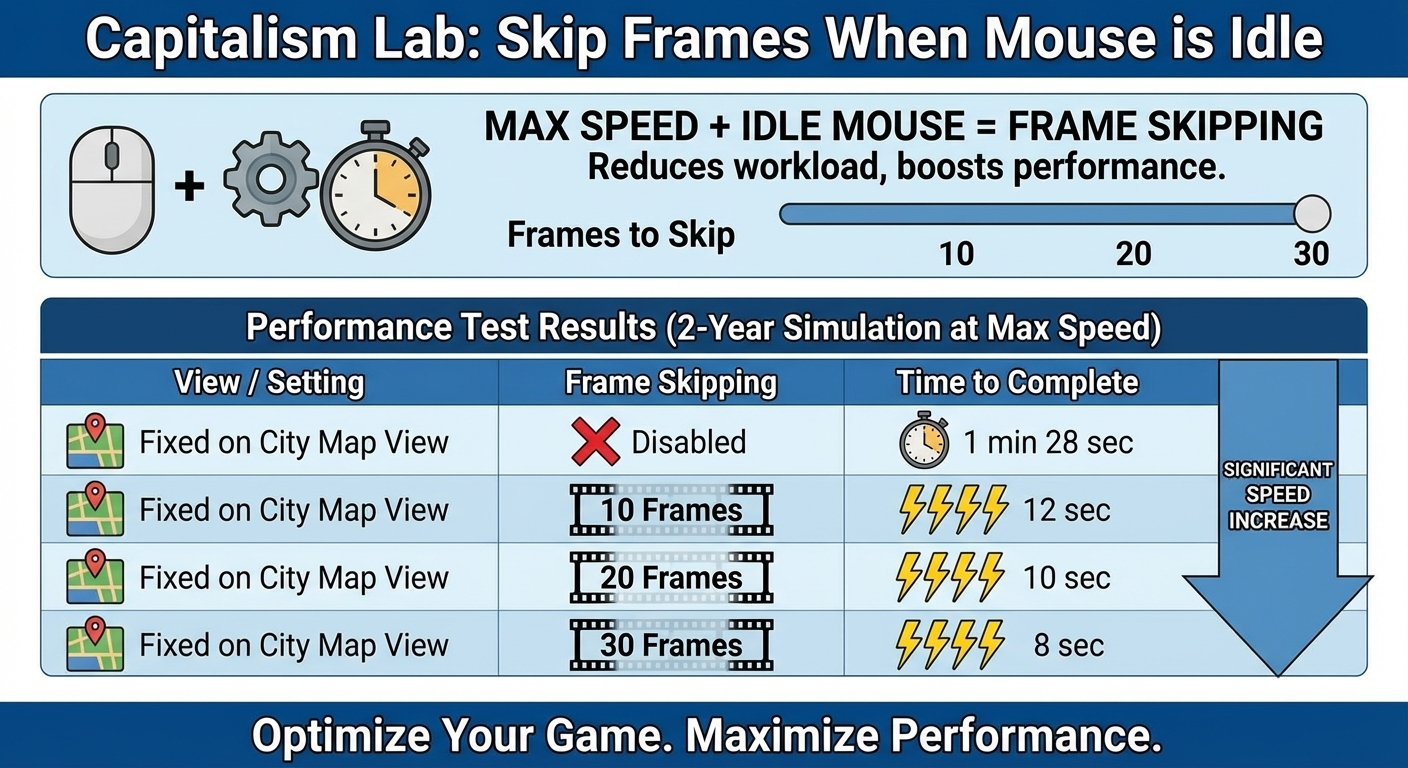
Capitalism Lab post release beta version 12.0.00 (see the download link below) introduces the "Skip Frames When the Mouse is Idle", a smart new option that dramatically speeds up simulation runs at maximum game speed.
Here’s how it works:
When you’re running the game at full speed and your mouse is idle (no panning or clicking), the game no longer renders every single frame. Instead, it periodically renders just one frame while skipping several in between. This cuts down the video processing workload and lets the simulation fly through in-game years much quicker.
We ran tests with a demanding setup: 50 companies, 7 cities, 2 in-game years at max speed. The results speak for themselves:
Download Capitalism Lab post release beta version 12.0.00 now from
https://www.capitalismlab.com/version120/