Page 2 of 4
Re: Problem with the tutorial files
Posted: Mon Aug 17, 2020 12:33 pm
by rafaeltodero
[/quote]
I have a solution. We make up all the French and Portuguese words starting with the first letter of the English word. ^^
[/quote]
It's an interesting idea.
Re: Problem with the tutorial files
Posted: Mon Aug 17, 2020 1:11 pm
by David
paulwoman wrote: Mon Aug 17, 2020 8:14 am
That's what makes the bug more frustrating: there is no difference between the line you gave me and the version generated by the software .
Anyway, the version I put online works, that's the main thing.
I will ask the programmer to look into this and get it fixed on the programming level.
paulwoman wrote: Mon Aug 17, 2020 8:14 am
There is one detail to be settled to make it easier:
The keyboard shortcuts for the objects are still in English.
The "English" word "Camera" is translated by "Appareil photo" and "Bath Lotion" by "Lotion de bain".
I can only do "C" and "B" to get them and not the first letter of the word in French.
I will discuss with the programmer for a solution on this and get back to you. Currently Asian languages are researched based on the non-translated text of the products. So it may need a configuration to specify whether the game should use the original text, or the translated text for researching.
Re: Problem with the tutorial files
Posted: Sat Aug 22, 2020 8:16 pm
by rafaeltodero

- erro Tutorial 7..png (1.61 MiB) Viewed 4893 times
I have this problem in tutorial 7.
He orders to select the exit, but the game shows above.
The exit is below.
Tutorial 7 file and script sent .
Re: Problem with the tutorial files
Posted: Sat Aug 22, 2020 11:03 pm
by paulwoman
I was able to make a version where this "bug" is not present thanks to my "old" French version.
Otherwise, I redo the first tutorial and I have "My Deparment Store" which remains in English.

- my department store.png (1.1 MiB) Viewed 4888 times
This only happens during the tutorial, as it translates well in a normal game.

- grand mag.png (76.43 KiB) Viewed 4888 times
I've tried to add "My department store" in trans_beta but it doesn't solve the "problem".
Re: Problem with the tutorial files
Posted: Sun Aug 23, 2020 9:21 am
by David
paulwoman wrote: Sat Aug 22, 2020 11:03 pm
I was able to make a version where this "bug" is not present thanks to my "old" French version.
Otherwise, I redo the first tutorial and I have "My Deparment Store" which remains in English.
You can edit the following section in tut01.txt:
[ACTION]
Build Firm=Department Store,
My Department Store
Center on firm=
My Department Store
Re: Problem with the tutorial files
Posted: Sun Aug 23, 2020 10:02 am
by paulwoman
David wrote: Sun Aug 23, 2020 9:21 am
You can edit the following section in tut01.txt:
[ACTION]
Build Firm=Department Store,
My Department Store
Center on firm=
My Department Store
Thank you. After some tests with the different conditions after these lines, the generated file works well

Re: Problem with the tutorial files
Posted: Sun Aug 23, 2020 11:09 pm
by paulwoman
With the new images, the tutorial 1 needs to be slightly updated for more comfort.

- tuto 1.png (648.59 KiB) Viewed 4876 times
In this regard, it would be good to add an explanation of the shortcuts to access the objectives.

- raccourcis.png (648.2 KiB) Viewed 4871 times
Note : I give the tutorial 1 to explain, but it also concerns the others where the place where it is allowed to click is shifted with respect to the real location.
Concerning tutorial 4, the problem with this part
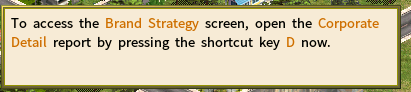
- tuto 04.png (15.63 KiB) Viewed 4870 times
when you install the game, the wasd function to navigate the map is enabled by default.
The ideal being thus to add a function which forces the deactivation of the option or to propose the solution without the shortcut.
Re: Problem with the tutorial files
Posted: Tue Aug 25, 2020 9:30 am
by David
All these issues have been fixed. Please download the latest version 6.6.02 from
viewtopic.php?f=10&t=7886
Re: Problem with the tutorial files
Posted: Wed Aug 26, 2020 2:03 pm
by paulwoman
Please note that this is more or less related to my proposal :
viewtopic.php?f=14&t=7895
Hello. Is it possible to have a clickable/important parts detection system.
If I leave the code as proposed in the original version the part I have to click on disappears.

- aaa.png (100.94 KiB) Viewed 4853 times
This forces me to "play" with it to put the text in a place that does not prevent me from continuing the tutorial in good conditions.
Code: Select all
[TEXT]
Les produits du bétail comprennent le ~bœuf congelé~, le ~lait~ et le ~cuir~. Chaque ~unité de transformation du bétail~ ne peut traiter qu'un seul produit à la fois.^^Cliquez maintenant sur ~Sélectionner le produit~ et sélectionnez ~Bœuf congelé~ parmi les choix disponibles.

[POS]
Text Box=100,410,700,0
Pointer=265,384,372,401
moreover, the part that shows where to click is here too small compared to what is marked.
Ideally, this clickable part automatically detects what is written.
The problem if we leave the situation as it is, is that each time I update the files in question, I have to modify the source file to put the above code in it.
Thank you.
Re: Problem with the tutorial files
Posted: Thu Aug 27, 2020 8:03 am
by David
paulwoman wrote: Wed Aug 26, 2020 2:03 pm
Please note that this is more or less related to my proposal :
viewtopic.php?f=14&t=7895
Hello. Is it possible to have a clickable/important parts detection system.
If I leave the code as proposed in the original version the part I have to click on disappears.
This forces me to "play" with it to put the text in a place that does not prevent me from continuing the tutorial in good conditions.
Les produits du bétail comprennent le ~bœuf congelé~, le ~lait~ et le ~cuir~. Chaque ~unité de transformation du bétail~ ne peut traiter qu'un seul produit à la fois.^^Cliquez maintenant sur ~Sélectionner le produit~ et sélectionnez ~Bœuf congelé~ parmi les choix disponibles.
1) You could change the following line
Text Box=<top-left horizontal coordinate of the text box>, <top-left vertical coordinate of the text box>, <width of the text box>,0
Text Box=100,410,700,0
For instance, you could change 410 to 350 to move the text box up by 60 pixels (410-350).
2) The position of the "Select Product" button will be center aligned.